3.1 JPA란?
- SQL을 자바에서 다루기 위해 만들어진 기술
3.2 프로젝트에 Spring Data JPA 적용하기
★ 주의!
- JPA Buddy를 설치해야 한다.
- 없으면
설정→플러그인에서 설치해준다.
- 없으면
- 플러그인을 활성화 하라는 메세지가 인텔리제이에서 뜨면 꼭 해줘야 한다.
build.gradle 설정해주기
- 정확하게 적어주지 않으면 뒤에 나올 코드들이 실행되지 않는다.
dependencies {
    // 1장
    implementation('org.springframework.boot:spring-boot-starter-web')
    testImplementation('org.springframework.boot:spring-boot-starter-test')

    // 2.3장 롬북
    // 2.4장
    annotationProcessor 'org.projectlombok:lombok'
    implementation 'org.projectlombok:lombok'
    testAnnotationProcessor 'org.projectlombok:lombok'
    testImplementation 'org.projectlombok:lombok'

    // 3.2장
    implementation 'org.springframework.boot:spring-boot-starter-data-jpa'
    implementation 'com.h2database:h2'
    testImplementation 'org.springframework.boot:spring-boot-starter-test'


}
domain 패키지 & Posts 클래스 만들기
-
domain 패키지 → posts 패키지 → Posts 클래스 순으로 만들기
-
Posts 클래스의 코드는 다음과 같다.
javapackage org.example.domain.posts; import lombok.Builder; import lombok.Getter; import lombok.NoArgsConstructor; import javax.persistence.*; // 3.2장 @Getter @NoArgsConstructor @Entity public class Posts { @Id @GeneratedValue(strategy = GenerationType.IDENTITY) private Long id; @Column(length = 500, nullable = false) private String title; @Column(columnDefinition = "TEXT", nullable = false) private String content; private String author; @Builder public Posts(String title, String content, String author) { this.title = title; this.content = content; this.author = author; } }
★ javax와 관련된 에러 해결
- 만약 @Entity 를 쳤는데 빨간색이 나온다면,
import javax를 쳐본다. - 이 상태로 그대로 실행/디버그 시 다음과 같이 에러가 뜰 가능성이 높다.
java: package javax.persistence does not exist
- javax의 반응이 없다면, 또는 빨간색이 뜬다면
- build.gradle을 잘못친 게 대부분이다.
'org.springframework.boot:spring-boot-starter-data-jpa'를
이상하게 치지 않았는지 확인해보자- 보통
starter를 빼먹고 치는 경우가 많다.
- 아니라면, 설정을 바꿔보자.
- 위쪽 메뉴에서 파일을 찾아보자
파일→설정→빌드→빌드 도구→Maven
→러너→IDE에게 위임하기
원리
Posts 클래스에는 Setter 메소드가 없다. 왜?
- 무작정 getter/setter를 생성하면
- 해당 클래스의 인스턴스 값이 언제 어디서 변해야 하는지
- 코드상으로 명확히 구분할 수 없다.
- 따라서, Entity 클래스에는 절대로 setter를 만들어주지 않는다.
Setter가 없다면 도대체 어떻게 값을 설정할 것인가?
- 기본: 생성자 이용
- 여기서는 @Builder를 이용한다.
PostsRepository 생성
- Posts 클래스로 DB에 접근하게 해줄 JpaRepository 이다.
- JPA를 사용하여 Repository를 만들 때는 JpaRepository<T, ID> 를 상속받는 Interface를 만들어 주기만 하면 된다.
- 그래서 인터페이스를 만들어주면 된다.
- 인터페이스 만들기: 마우스 오른쪽 클릭
- 새로 만들기 → JAVA 클래스→ 인터페이스
package org.example.domain.posts;

import org.springframework.data.jpa.repository.JpaRepository;

public interface PostsRepository extends JpaRepository<Posts, Long> {
}
3.3 Spring Data JPA 테스트 코드 작성하기
PostsRepositoryTest 생성
save와findAll기능 테스트용
package org.example.web.domain.posts;
// 3.3장

import org.example.domain.posts.Posts;
import org.example.domain.posts.PostsRepository;
import org.junit.After;
import org.junit.Test;
import org.junit.runner.RunWith;
import org.springframework.beans.factory.annotation.Autowired;
import org.springframework.boot.test.context.SpringBootTest;
import org.springframework.test.context.junit4.SpringRunner;

import java.util.List; // 직접 추가
import static org.assertj.core.api.Assertions.assertThat; // 직접추가


// 3.3장
@RunWith(SpringRunner.class)
@SpringBootTest
public class PostsRepositoryTest {
    @Autowired
    PostsRepository postsRepository;

    @After
    public void cleanup() {
        postsRepository.deleteAll();
    }

    @Test
    public void bring_savedText() {
        // given
        String title = "테스트 게시글";
        String content = "테스트 본문";

        postsRepository.save(Posts.builder()
                .title(title)
                .content(content)
                .author("asdfb@gmail.com")
                .build());

        // when
        List<Posts> postsList = postsRepository.findAll();

        // then
        Posts posts = postsList.get(0);
        assertThat(posts.getTitle()).isEqualTo(title);
        assertThat(posts.getContent()).isEqualTo(content);
    }
}
★ 실제로 실행된 쿼리를 로그로 보기
application.properties 만들어주기
src/main/resources에 만들어주면 된다.- 중요! 책에서 나온 코드가 아닌 다음 코드로 해줘야 이렇게 보인다.
spring.jpa.properties.hibernate.show_sql=true
위의 코드로 했을 때 쿼리 모습
2022-08-05 15:54:56.486  INFO 12408 --- [           main] org.hibernate.Version                    : HHH000412: Hibernate Core {5.3.10.Final}
2022-08-05 15:54:56.486  INFO 12408 --- [           main] org.hibernate.cfg.Environment            : HHH000206: hibernate.properties not found
2022-08-05 15:54:56.599  INFO 12408 --- [           main] o.hibernate.annotations.common.Version   : HCANN000001: Hibernate Commons Annotations {5.0.4.Final}
2022-08-05 15:54:57.170  INFO 12408 --- [           main] org.hibernate.dialect.Dialect            : HHH000400: Using dialect: org.hibernate.dialect.H2Dialect
Hibernate: drop table posts if exists
Hibernate: create table posts (id bigint generated by default as identity, author varchar(255), content TEXT not null, title varchar(500) not null, primary key (id))
2022-08-05 15:54:57.627  INFO 12408 --- [           main] o.h.t.schema.internal.SchemaCreatorImpl  : HHH000476: Executing import script 'org.hibernate.tool.schema.internal.exec.ScriptSourceInputNonExistentImpl@4f7be6c8'
2022-08-05 15:54:57.627  INFO 12408 --- [           main] j.LocalContainerEntityManagerFactoryBean : Initialized JPA EntityManagerFactory for persistence unit 'default'
2022-08-05 15:54:58.383  INFO 12408 --- [           main] o.s.s.concurrent.ThreadPoolTaskExecutor  : Initializing ExecutorService 'applicationTaskExecutor'
2022-08-05 15:54:58.449  WARN 12408 --- [           main] aWebConfiguration$JpaWebMvcConfiguration : spring.jpa.open-in-view is enabled by default. Therefore, database queries may be performed during view rendering. Explicitly configure spring.jpa.open-in-view to disable this warning
2022-08-05 15:54:58.751  INFO 12408 --- [           main] o.e.w.domain.posts.PostsRepositoryTest   : Started PostsRepositoryTest in 4.282 seconds (JVM running for 5.294)
Hibernate: insert into posts (id, author, content, title) values (null, ?, ?, ?)
2022-08-05 15:54:58.912  INFO 12408 --- [           main] o.h.h.i.QueryTranslatorFactoryInitiator  : HHH000397: Using ASTQueryTranslatorFactory
Hibernate: select posts0_.id as id1_0_, posts0_.author as author2_0_, posts0_.content as content3_0_, posts0_.title as title4_0_ from posts posts0_
Hibernate: select posts0_.id as id1_0_, posts0_.author as author2_0_, posts0_.content as content3_0_, posts0_.title as title4_0_ from posts posts0_
Hibernate: delete from posts where id=?
2022-08-05 15:54:59.205  INFO 12408 --- [       Thread-2] o.s.s.concurrent.ThreadPoolTaskExecutor  : Shutting down ExecutorService 'applicationTaskExecutor'
2022-08-05 15:54:59.205  INFO 12408 --- [       Thread-2] j.LocalContainerEntityManagerFactoryBean : Closing JPA EntityManagerFactory for persistence unit 'default'
2022-08-05 15:54:59.205  INFO 12408 --- [       Thread-2] .SchemaDropperImpl$DelayedDropActionImpl : HHH000477: Starting delayed evictData of schema as part of SessionFactory shut-down'
Hibernate: drop table posts if exists
2022-08-05 15:54:59.205  INFO 12408 --- [       Thread-2] com.zaxxer.hikari.HikariDataSource       : HikariPool-1 - Shutdown initiated...
2022-08-05 15:54:59.205  INFO 12408 --- [       Thread-2] com.zaxxer.hikari.HikariDataSource       : HikariPool-1 - Shutdown completed.
application.properties 수정하기
이 줄을 보자. H2의 쿼리 문법이 적용되었다.
Hibernate: create table posts (id bigint generated by default as identity, author varchar(255), content TEXT not null, title varchar(500) not null, primary key (id))
이를 MYSQL의 문법으로 바꿔보자.
- 출력되는 쿼리 로그를 MYSQL 버전으로 바꾸겠다는 뜻.
- application.properties에 추가해주면 된다.
spring.jpa.properties.hibernate.dialect=org.hibernate.dialect.MySQL5InnoDBDialect
- 스프링부트 2.1.10부터는 다음과 같다.
spring.jpa.properties.hibernate.dialect=org.hibernate.dialect.MySQL57Dialect
spring.jpa.properties.hibernate.dialect.storage_engine=innodb
spring.datasource.hikari.jdbc-url=jdbc:h2:mem://localhost/~/testdb;MODE=MYSQL
적용했을 때 쿼리 줄 중에 다음과 같은 문장이 있으면 성공이다.
Hibernate: create table posts (id bigint not null auto_increment, author varchar(255), content TEXT not null, title varchar(500) not null, primary key (id)) engine=InnoDB
.properties 파일에 주석 넣어주기
- .properties 파일에서 주석은 줄 맨 앞에 #이나 !로 시작한다.
- 이 때 해당 줄의 나머지 문자열들은 모두 무시된다.
# You are reading the ".properties" entry.
! The exclamation mark can also mark text as comments.
# The key and element characters #, !, =, and : are written with
# a preceding backslash to ensure that they are properly loaded.
website = http\://en.wikipedia.org/
language = English
# The backslash below tells the application to continue reading
# the value onto the next line.
message = Welcome to \
          Wikipedia!
# Add spaces to the key
key\ with\ spaces = This is the value that could be looked up with the key "key with spaces".
# Unicode
tab : \u0009
3.4 등록/수정/조회 API 만들기
API란? 모르면 클릭!
API를 만들기 위해선 3가지 클래스가 필요하다
- Dto : Request 데이터를 받는 클래스
- Controller : API 요청을 받는 클래스
- Service : 트랜잭션, 도메인 기능 간의 순서를 보장하는 클래스
원리
- Web Layer
- 컨트롤러와 뷰 템플릿의 영역
- 외부 요청과 응답에 대한 전반적인 영역을 이야기
- Service Layer
- Controller와 dto 사이에 위치
- Transactional이 사용되어야 하는 영역
- Repository Layer
- 데이터베이스에 접근하는 영역
- DTO = data transfer object
- 계층 간의 데이터 교환을 위한 객체
- Domain Model
- 개발 대상 = 도메인
- 도메일을 모든 사람이 동일한 관점에서 이해 및 공유할 수 있게 단순화시켜 놓은 것을 도메인 모델이라고 함.
- ex. 택시 앱
- Domain : 배차, 탑승 요금
등록, 수정, 삭제 기능 만들기 (1) : 등록
- 만드는 중간에 변수나 메소드에 빨간불이 들어와도 그냥 다 치면 된다.
- 아직 해당 변수나 기능이 담긴 다른 메소드가 안 만들어져서 생기는 것
- 그냥 쭉 만들면 해결된다.
-
PostsApiController만들기코드
java -
PostsService만들기코드
java -
PostsSaveRequestDto만들기코드
java
test 해보기: PostsApiControllerTest 만들기
코드
package web;

import org.example.domain.posts.Posts;
import org.example.domain.posts.PostsRepository;
import org.springframework.boot.test.web.client.TestRestTemplate;
import web.dto.PostsSaveRequestDto;
import org.junit.After;
import org.junit.Test;
import org.junit.runner.RunWith;
import org.springframework.beans.factory.annotation.Autowired;
import org.springframework.boot.test.context.SpringBootTest;
import org.springframework.boot.web.server.LocalServerPort;
import org.springframework.http.HttpStatus;
import org.springframework.http.ResponseEntity;
import org.springframework.test.context.junit4.SpringRunner;

import java.util.List; // 직접입력
import static org.assertj.core.api.Assertions.assertThat; // 직접입력


// 3.4장 마지막 파트
@RunWith(SpringRunner.class)
@SpringBootTest(webEnvironment = SpringBootTest.WebEnvironment.RANDOM_PORT)
public class PostsApiControllerTest {
    @LocalServerPort
    private int port;

    @Autowired
    private TestRestTemplate restTemplate;

    @Autowired
    private PostsRepository postsRepository;

    @After
    public void tearDown() throws Exception {
        postsRepository.deleteAll();
    }

    @Test
    public void upload_posts() throws Exception {
        //given
        String title = "title";
        String content = "content";
        PostsSaveRequestDto requestDto = PostsSaveRequestDto
                .builder()
                .title(title)
                .author("author")
                .build();

        String url = "http://localhost:" + port + "/api/v1/posts";

        //when
        ResponseEntity<Long> responseEntity = restTemplate.postForEntity(url, requestDto, Long.class);

        //then
        assertThat(responseEntity.getStatusCode()).isEqualTo(HttpStatus.OK);
        assertThat(responseEntity.getBody()).isGreaterThan(0L);

        List<Posts> all = postsRepository.findAll();
        assertThat(all.get(0).getTitle()).isEqualTo(title);
        assertThat(all.get(0).getContent()).isEqualTo(content);
    }

}
결과 쿼리 중 다음 문장이 있어야 한다.
Hibernate: insert into posts (author, content, title) values (?, ?, ?)
등록, 수정, 삭제 기능 만들기 (2) : 수정 & 삭제
-
PostsApiController에 코드 추가코드
sql- 코드를 쳐 보면 알겠지만 안 만들어진 부분(빨간 색 부분) 이 세 가지다.
- 첫 번째,
PostsResponseDto이다. - 두 번째,
PostsUpdateRequestDto - 마지막,
PostsService속 함수.
-
PostsResponseDto만들기
코드
package org.example.web.dto;

import org.example.domain.posts.Posts;
import org.example.domain.posts.PostsRepository;

// 3.4장 수정 & 삭제
public class PostsResponseDto {
    private Long id;
    private String title;
    private String content;
    private String author;

    public PostsResponseDto(Posts entity) {
        this.id = entity.getId();
        this.title = entity.getTitle();
        this.content = entity.getContent();
        this.author = entity.getContent();
    }
}
-
PostsUpdateRequestDto만들기코드
javapackage org.example.web.dto; import lombok.Builder; import lombok.Getter; import lombok.NoArgsConstructor; @Getter @NoArgsConstructor public class PostsUpdateRequestDto { private String title; private String content; @Builder public PostsUpdateRequestDto(String title, String content) { this.title = title; this.content = content; } } -
PostsService업데이트단, 그 전에 먼저
Posts를 업그레이드 해야 한다.java// 3.2장 @Getter @NoArgsConstructor @Entity public class Posts { @Id @GeneratedValue(strategy = GenerationType.IDENTITY) private Long id; @Column(length = 500, nullable = false) private String title; @Column(columnDefinition = "TEXT", nullable = false) private String content; private String author; @Builder public Posts(String title, String content, String author) { this.title = title; this.content = content; this.author = author; } // 3.4장 수정 & 삭제 public void update (String title, String content) { this.title = title; this.content = content; } }PostsService업데이트 코드java// 3.4장 등록 파트 @RequiredArgsConstructor @Service public class PostsService { private final PostsRepository postsRepository; @Transactional public Long save(PostsSaveRequestDto requestDto) { return postsRepository.save(requestDto.toEntity()).getId(); } // 3.4 수정 & 삭제 파트 @Transactional public Long update(Long id, PostsUpdateRequestDto requestDto) { Posts posts = postsRepository.findById(id) .orElseThrow(() -> new IllegalArgumentException("해당 게시글이 없습니다. id=" + id)); posts.update(requestDto.getTitle(), requestDto.getContent()); return id; } public PostsResponseDto findById(Long id) { Posts entity = postsRepository.findById(id) .orElseThrow(() -> new IllegalArgumentException("해당 게시글이 없습니다. id=" + id)); return new PostsResponseDto(entity); } }
test : 수정과 삭제가 되는 지 테스트 해보기
PostsApiControllerTest 수정하기
코드
package org.example.web.domain.posts.web;

import org.example.domain.posts.Posts;
import org.example.domain.posts.PostsRepository;
import org.example.web.dto.PostsUpdateRequestDto;
import org.springframework.boot.test.web.client.TestRestTemplate;
import org.example.web.dto.PostsSaveRequestDto;
import org.junit.After;
import org.junit.Test;
import org.junit.runner.RunWith;
import org.springframework.beans.factory.annotation.Autowired;
import org.springframework.boot.test.context.SpringBootTest;
import org.springframework.boot.web.server.LocalServerPort;
import org.springframework.http.HttpEntity;
import org.springframework.http.HttpMethod;
import org.springframework.http.HttpStatus;
import org.springframework.http.ResponseEntity;
import org.springframework.test.context.junit4.SpringRunner;

import java.util.List; // 직접입력
import static org.assertj.core.api.Assertions.assertThat; // 직접입력


// 3.4장 등록 파트 마지막
@RunWith(SpringRunner.class)
@SpringBootTest(webEnvironment = SpringBootTest.WebEnvironment.RANDOM_PORT)
public class PostsApiControllerTest {
    @LocalServerPort
    private int port;

    @Autowired
    private TestRestTemplate restTemplate;

    @Autowired
    private PostsRepository postsRepository;

    @After
    public void tearDown() throws Exception {
        postsRepository.deleteAll();
    }

    @Test
    public void upload_posts() throws Exception {
        //given
        String title = "title";
        String content = "content";
        PostsSaveRequestDto requestDto = PostsSaveRequestDto
                .builder()
                .title(title)
                .author("author")
                .build();

        String url = "http://localhost:" + port + "/api/v1/posts";

        //when
        ResponseEntity<Long> responseEntity = restTemplate.postForEntity(url, requestDto, Long.class);

        //then
        assertThat(responseEntity.getStatusCode()).isEqualTo(HttpStatus.OK);
        assertThat(responseEntity.getBody()).isGreaterThan(0L);

        List<Posts> all = postsRepository.findAll();
        assertThat(all.get(0).getTitle()).isEqualTo(title);
        assertThat(all.get(0).getContent()).isEqualTo(content);
    }

// 3.4장 수정 & 삭제 테스트 파트
    @Test
    public void change_posts() throws Exception {
        //given
        Posts savedPosts = postsRepository.save(Posts.builder()
                .title("title")
                .content("content")
                .author("author")
                .build());
        Long updateId = savedPosts.getId();
        String expectedTitle = "title2";
        String expectedContent = "Content2";

        PostsUpdateRequestDto requestDto = PostsUpdateRequestDto.builder()
                .title(expectedTitle)
                .content(expectedContent)
                .build();

        String url = "http://localhost:" + port + "api/v1/posts/" + updateId;
        HttpEntity<PostsUpdateRequestDto> requestEntity =
                new HttpEntity<>(requestDto);

        // when
        ResponseEntity<Long> responseEntity = restTemplate.exchange(url, HttpMethod.PUT, requestEntity, Long.class);

        // then
        assertThat(responseEntity.getStatusCode()).isEqualTo(HttpStatus.OK);
        assertThat(responseEntity.getBody()).isGreaterThan(0L);

        List<Posts> all = postsRepository.findAll();
        assertThat(all.get(0).getTitle()).isEqualTo(expectedTitle);
        assertThat(all.get(0).getContent()).isEqualTo(expectedContent);

    }

}
결과 쿼리 중 다음 문장이 있어야 한다.
Hibernate: update posts set author=?, content=?, title=? where id=?
test : 실제 눈에 보이는 페이지로 확인
- 먼저 application.properties에 다음 옵션을 추가한다.
! 3.3장
spring.jpa.properties.hibernate.show_sql=true
spring.jpa.properties.hibernate.dialect=org.hibernate.dialect.MySQL5InnoDBDialect
! 3.4장
spring.h2.console.enabled=true
-
Application 클래스의 main 메소드를 실행한다.
-
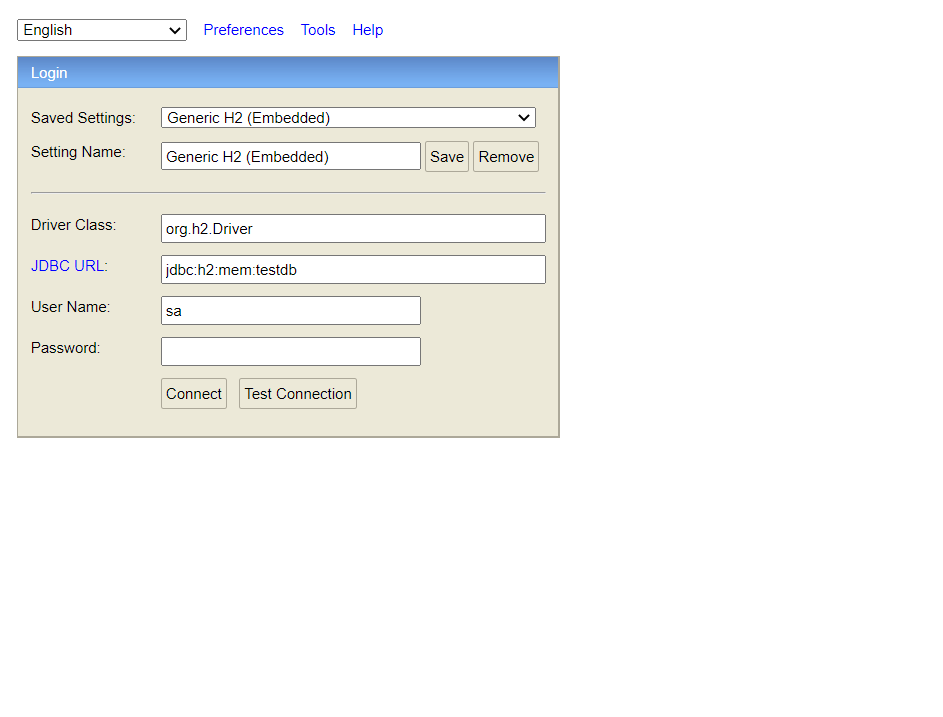
JDBC URL이 jbdc:h2:mem:testdb로 되어있는 지 확인
- 안 되어 있으면 바꿔주기
-
connect누르고Posts테이블이 나와 있는지 보기 -
간단한 쿼리 입력
sqlselect * from posts;sqlinsert into posts (author, content, title) values ('author', 'content', 'title'); -
쿼리가 들어갔는지 확인
-
브라우저로 api 조회
3.5 JPA Auditing으로 생성시간/수정시간 자동화하기
- 엔티티에는 생성 & 수정시간 포함
- 유지보수에 필요한 정보이기 때문
- 이를 자동화하는 코드를 만들어보는 것이 목표
LocalDate 사용
-
domain패키지에BaseTimeEntity클래스 생성-
BaseTimeEntity는 모든 Entity의 상위클래스가 되어 Entity의생성날짜와 수정날짜를 자동으로 관리한다.
코드
sqlpackage org.example.domain; import lombok.Getter; import org.springframework.data.annotation.CreatedDate; import org.springframework.data.annotation.LastModifiedDate; import org.springframework.data.jpa.domain.support.AuditingEntityListener; import javax.persistence.EntityListeners; import javax.persistence.MappedSuperclass; import java.time.LocalDateTime; // 3.5장 @Getter @MappedSuperclass @EntityListeners(AuditingEntityListener.class) public abstract class BaseTimeEntity { @CreatedDate private LocalDateTime createdDate; @LastModifiedDate private LocalDateTime modifiedDate; } -
-
Posts클래스가BaseTimeEntity를 상속받도록 변경코드
java// 3.2장 @Getter @NoArgsConstructor @Entity public class Posts extends BaseTimeEntity { /* 3.5장에서 BaseTimeEntity 상속 추가*/ @Id @GeneratedValue(strategy = GenerationType.IDENTITY) private Long id; @Column(length = 500, nullable = false) private String title; @Column(columnDefinition = "TEXT", nullable = false) private String content; private String author; @Builder public Posts(String title, String content, String author) { this.title = title; this.content = content; this.author = author; } // 3.4장 수정 & 삭제 public void update (String title, String content) { this.title = title; this.content = content; } } -
Application 클래스에 활성화 어노테이션 추가
코드
javapackage org.example; import org.springframework.boot.SpringApplication; import org.springframework.boot.autoconfigure.SpringBootApplication; import org.springframework.data.jpa.repository.config.EnableJpaAuditing; // 2.1장 @SpringBootApplication @EnableJpaAuditing /* 3.5장에서 어노테이션 추가*/ public class Application { public static void main(String[] args) { SpringApplication.run(Application.class, args); } }
test : 테스트 해보기
PostsRepositoryTest 클래스에 테스트 메소드 추가
package org.example.web.domain.posts;
// 3.3장

import org.example.domain.posts.Posts;
import org.example.domain.posts.PostsRepository;
import org.junit.After;
import org.junit.Test;
import org.junit.runner.RunWith;
import org.springframework.beans.factory.annotation.Autowired;
import org.springframework.boot.test.context.SpringBootTest;
import org.springframework.test.context.junit4.SpringRunner;

import java.time.LocalDateTime;
import java.util.List; // 직접 추가
import static org.assertj.core.api.Assertions.assertThat; // 직접추가


// 3.3장
@RunWith(SpringRunner.class)
@SpringBootTest
public class PostsRepositoryTest {
    @Autowired
    PostsRepository postsRepository;

    @After
    public void cleanup() {
        postsRepository.deleteAll();
    }

    @Test
    public void bring_savedText() {
        // given
        String title = "테스트 게시글";
        String content = "테스트 본문";

        postsRepository.save(Posts.builder()
                .title(title)
                .content(content)
                .author("asdfb@gmail.com")
                .build());

        // when
        List<Posts> postsList = postsRepository.findAll();

        // then
        Posts posts = postsList.get(0);
        assertThat(posts.getTitle()).isEqualTo(title);
        assertThat(posts.getContent()).isEqualTo(content);
    }
// 3.5장
    @Test
    public void BaseTimeEntity_Enroll() {
        //given
        LocalDateTime now = LocalDateTime.of(2019,6,4,0,0,0);
        postsRepository.save(Posts.builder()
                .title("title")
                .content("content")
                .author("author")
                .build());

        //when
        List<Posts> postsList = postsRepository.findAll();

        //then
        Posts posts = postsList.get(0);

        System.out.println(">>>>>>>> createDate = " + posts.getCreatedDate()
                    + "modifiedDate = " + posts.getModifiedDate());
        assertThat(posts.getCreatedDate()).isAfter(now);
        assertThat(posts.getModifiedDate()).isAfter(now);
    }
}
테스트 했을 때 다음 쿼리가 나오면 성공.
시간은 코드가 실행되고 있는 바로 지금! 시간이 들어가야 한다.
>>>>>>>> createDate = 2022-08-05T18:09:39.856modifiedDate = 2022-08-05T18:09:39.856